
Creativity, flexibility, simplicity

Business Report Designer
The design studio of the ReportingSoft suite: business teams build and maintain report templates themselves, in the browser, without writing a line of code.
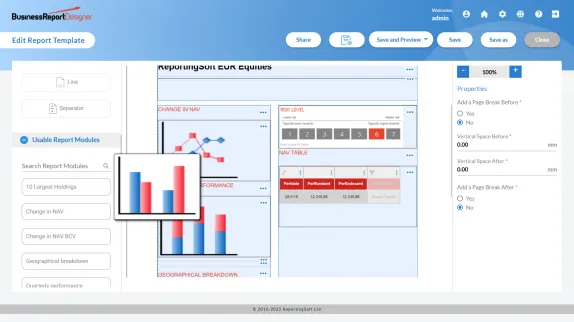
Self-Service Report Design, No Code Required
Business Report Designer is a powerful reporting tool that allows users without prior reporting experience to create new reports and customize existing ones with just a few clicks. The data in the reports is pre-approved and audited and the generated report documents can be forwarded to a client, investor or partner.
Easy to use, flexible and reliable, the solution fits seamlessly with your existing IT applications, and does not require any prior reporting know-how. Installation and support are performed by one of our consultants.
Business Report Designer is the latest addition to our Reporting Maestro software platform which provides automated report generation and distribution through various mediums.
Discover the key benefits of Business Report Designer
Reliability and quality
The reports are based on data from approved and audited sources, minimizing the risk of error.
Independence
This tool does not require any prior reporting know-how and does not require any IT department assistance in order to create reports.
Creative layout
The solution allows you to create attractive layouts that are aesthetic, flexible and personalized.
Performance
The software meets all reporting requirements and delivers high-quality reports, improving the design process and reducing recurring tasks.
Collaboration
The page layouts and report templates created can be shared and enriched in collaboration with other users.
Flexibility
The content and format of the report can be customized in a modular, interactive and dynamic process.
Who is Business Report Designer for?
This reporting software is designed for any organization requiring an easy-to-use, intuitive and powerful reporting system. Particularly well-suited to the private sector and the financial industry, this tool is also highly recommended for institutions or non-governmental organizations.
Private Sector
- asset management
- private banking
- insurance
- software vendors (OEM)
- real estate management
- medical and healthcare institutions
Public Sector
- administrations
- institutions
- NGO's
What types of documents can be created using the Business Report Designer software?
The Business Report Designer reporting tool allows you to create all types of documents such as lists, statements, invoices, accounting reports, client reports, investment proposals, factsheets, KIIDs, etc.; reports can be produced in various output formats and in several languages, e.g. e-mail, letter, PDF file, PowerPoint presentation slides or documents for a meeting.
Reports can contain tables, cross-tabs and graphs, displaying detailed information such as operational and aggregated analytical data in a standard multi-page or dashboard layout, with indicators (KPI).
Examples of indicators which can be displayed in the reports are:
- Breakdown by asset class
- Breakdown by geographical sector
- Quarterly, monthly, daily performance
What it gives your team
- Intuitive, 100% web interface
- Drag-and-drop design entirely in the browser: nothing to install, nothing to maintain on workstations.
- Real-time preview
- See the finished report as you build it, with live data, before anything is published.
- Rapid design without technical skills
- Report specialists create and change layouts themselves: no development cycle, no waiting on IT.
- Reusable templates, centrally managed
- Build a component once and reuse it across every mandate; one change updates every report that uses it.
- PDF, Word, Excel and HTML output
- One template produces every format your clients and processes expect.
- Dynamic parameters and custom fields
- The same template serves many clients, portfolios and periods: parameters do the work.
- Built-in quality control
- Checks run before export, so an inconsistent report never leaves the studio.
- Single sign-on
- Users sign in through your identity provider: no separate accounts to manage.